Log in to join the conversation.
Zombicide Tile Edge System V2 - Reworked & Fixes
Please support Dan Høegh by Liking/Boosting their Print on MakerWorld.
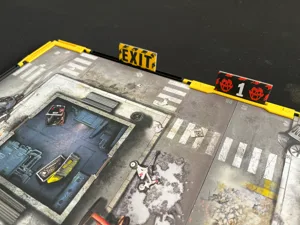
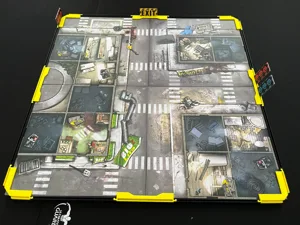
Tile Edge System designed for Zombicide, to stop the tiles from sliding apart etc.
Works with any board game that has 250 x 250 mm tiles with a recommended max tile height of 2.7 mm (there is a 3mm space in the design).
Update (2026/05/08):
• Changed length of the special Straight for train tracks to 6mm shorter due to feedback from user.
• The length is now based on a tile size of 250mm x 84 mm.
The Undead or Alive update (2026/04/25):
@jonogo asked if I could add support for the train track tiles in Undead or Alive... Well, of course!
• Added .stl and print plate with two new straight-piece for the train tiles in Undead or Alive .
• I don't own Undead or Alive so:
• I have based the measurements on data from a friendly user, thank you @jonogo (Tiles should be 250mm x 90mm for the new straight to match)
• I have based my choices on the missions from the Undead or Alive rule book.
• See image with simulated tile, you can find it in the model pictures.
• I have no way of testing. PLEASE let me know If you have any issues!
New in V2:
• Increased the space for tiles to avoid tiles being damaged (pinched) when assembling the set.
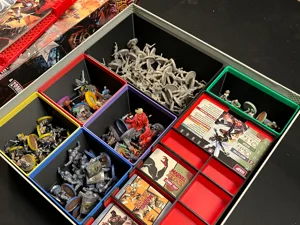
• Added in-box storage (inserts). The boxes are slightly higher than the stack of tiles, which is on purpose to ensure space for the parts.
• Removed the need for clips to reduce complexity of assembly and use. The new system should be solid enough for plenty of uses.
Designed for:
• Comfort of play
• No more tiles that gets displaced or shifted during moving of zombie hordes.
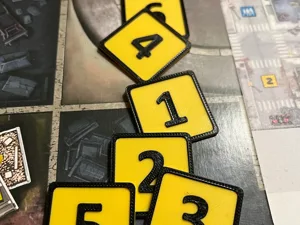
• Spawn markers and Exit markers are easily seen by players.
• Low cost
• Fast print
• Durability
Print instructions:
• Print the parts you need.
• Keep supports on for the inverted corner pieces.
• Add brims if you are not confident in your build plate.
• KEEP BRIMS on the Undead or Alive straights (StraightTrainTracks)
Usage Instructions:
The system has been designed for easy use if you follow these guides.
• Assembly: When assembling your tiles, put on the Corners and the Straights first, then add Connectors afterwards.
• Disassembly: When disassembling, remove the Connectors first.
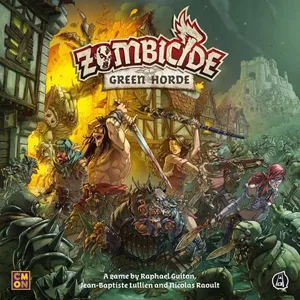 Zombicide: Green Horde 2018
Match filament
Show 16 more
Zombicide: Fantasy Quest B39 – Neverending Night 2021 Zombicide: Fantasy Quest B40 – The Flying Plague (Part 1) 2021 Zombicide: Fantasy Quest B17 – Dangerous Portals 2020 Zombicide: Fantasy Quest B18 – Naevok, the Necromancer 2020 Zombicide: Fantasy Quest B19 – Secure the Trebuchet 2020 Zombicide: Fantasy Quest B21 – The Orc's Trap 2020 Zombicide: Fantasy Quest B22 – Threatening Horde 2020 Zombicide: Fantasy Quest B24 – Trebuchet repairs 2020 Zombicide: Fantasy Quest B25 – A Party Divided 2020 Zombicide: Fantasy Quest B26 – Gear Up 2020 Zombicide: Fantasy Quest B30 – Trebuchet Touché 2020 Zombicide: Fantasy Quest B12 – Improvised Projectile 2019 Zombicide: Fantasy Quest B13 – Trial by Fire 2019 Zombicide: Fantasy Quest B15 – The Banshee 2019/pic4275956.jpg) Zombicide: Green Horde – Liam Survivor 2018
Zombicide: Green Horde – Liam Survivor 2018
/pic4354897.jpg) Zombicide: Green Horde – North the Halfling 2018
Zombicide: Green Horde – North the Halfling 2018