Log in to join the conversation.
Urban Sprawl 3D Buildings and Insert
Please support Firepigeon by Liking/Boosting their Print on Printables.
In the remix part of this models, I took the original designs and separated the buildings individually. When you print, feel free to choose your distribution of short/tall buildings.
RED:
4 copies of Building 2x2
8 copies of Building 1x2
12 copies of Building 1x1
6 copies of Building L
BLUE:
4 copies of Building 2x2
4 copies of Building 1x2
6 copies of Building 1x1
7 copies of Building L
YELLOW:
5 copies of Building 2x2
12 copies of Building 1x2
12 copies of Building 1x1
7 copies of Building L
PURPLE:
2 copies of Building 2x2
6 copies of Building 1x2
18 copies of Building 1x1
3 copies of Building L
GREEN:
1 copy of Park 2x2
2 copies of Park 1x2
24 copies of Park 1x1
1 copy of Park L
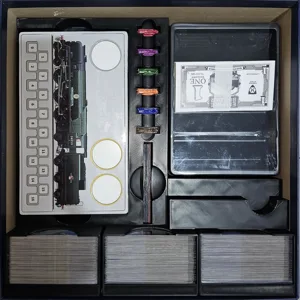
If you are printing the Insert part keep in mind the boxes for the buildings were created for a good variety of buildings height and if you print only the tallest buildings they will not fit. Keep this in mind as the boxes are big enough that only a couple of buildings need to be stacked.
The Insert is not designed to have the paper money (poker chips are always the best bet for this kind of games) but you can still squeeze them below the map on top of the big building box on the second layer.
For the Insert print everything once except the files ending with x4, that need to be printed 4 times. The card boxes can go directly into the gameboard.
As optional there are files to print the number (in red for 4 5 6, and in yellow for 7 8 9 10). You just need to insert in your slice a pause when the numbers start printing in order to change filament (white for 4 5 6, and black for 7 8 9 10).
There are also optional tokens (score token and cube) more fitting for the player pieces if you note the squares on top of the buildings are too tight.
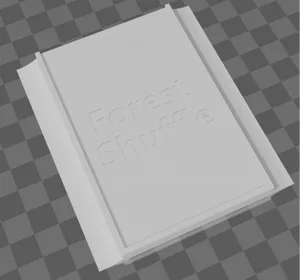
You may print everything solid or you may go for the effect you see on the photos. In order to achieve this on your slicer go on the object level, select the lid you want, reduce the top and bottom layers to 0, and select the infill density and pattern you like. For the box bottom where you can also add this effect, first add a modifier that cover all the bottom of the box and then do the same configuration on the modifier only.
If you do not own a 3D Printer you may still get this physically printed in my store: 3DPrintforGames.etsy.com
Remixed 3D Buildings and Insert: The main design idea was to make use of the 3D Buildings and have a organizer for them. For this, they are stored in a box per color, and also adding 3D tokens for the players and row values. Accepts sleeved cards and the card boxes can go directly into the gameboard. It has a lid lift if you care about that. It does not have space for the paper money (use poker chips) but you may stack it on top of the 2nd layer building box. If you do not own a 3D Printer you may still get this physically printed in my store: 3DPrintforGames.etsy.com
More by Firepigeon