Design by Carlo Bortolini
Art by Miguel Coimbra · Published by 1 More Time Games
Box 8 × 8 × 1.9 in (20.3 × 20.3 × 4.8 cm)
· English/German edition (2021). Editions vary, check your copy before printing an insert.
The Rifts changed our world. Villages were torn apart, Riftforce emerged from it and spread across the land. What seemed lifeless before started to rise and wake. Flames left campfires and waves poured out of their riverbeds. Even the sun and moon leave their footprints in the ground.
We learned how to control those living elementals and formed guilds to perfect this knowledge. While competing for Riftforce the guilds forged temporary alliances to share their unique abilities and guard the access to the Rifts.
Now it is your time! Choose your guilds, combine their powers and rush into battle. Gain Riftforce from the land you control and all the elementals you destroy until you have enough to ascend into a higher state of power.
•••
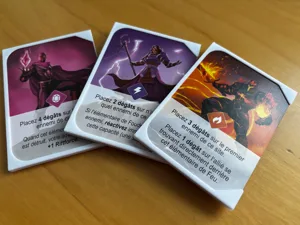
In Riftforce, the two-player duel card game, each player starts by drafting four of the ten different guilds, each with a unique power, to forge their own asymmetrical alliance. Every game of Riftforce gives you a chance to discover new synergies between guilds which will greatly influence your overall strategy and strengths. Can you combine the flexible and mobile water guild with the all-consuming fire elementals who even harm their allies and unleash their full potential?
The guilds’ elementals are the lifeblood of the game - they are your troops and at the same time the resource necessary to attack. Soon you will find yourself wondering how to use them best. Each turn you are torn, choosing one of three possible actions. Do you want to strengthen your position at the Rift, sacrifice elementals for powerful combo attacks or gather support for your next turn?
Gain Riftforce by destroying the elements of your opponent and by controlling locations along the Rift. Only then will you ascend and win the game.
Discovering new synergies between the different guilds, clever gameplay combos and the deeper layers of strategy will keep you coming back to enjoy the game again and again.
Card Game, Fantasy, Fighting · Hand Management, Open Drafting, Race, Variable Player Powers
More ▾
View on BGG ↗
/pic6461275.jpg)