Log in to join the conversation.
SCOUT Card Game - Combo Half-Card Hider & 'Who Placed' Arrow
Please support ds679 by Liking/Boosting their Print on Printables.
UPDATE 2: I've included two new models for those looking to print the parts individually (and then use a drop of glue to hold together). The files are: Individual-Arrow_Only & Individual-Case_Only (which actually has the arrow hole sized increased +.5mm to help ensure the arrow fits and sits flat). While it might seem that the Case_Only one might need supports (to fill in the missing arrow area) - I was successful in printing without supports (looked a bit ugly in that area but doesn't matter as it gets covered with the arrow anyways). YMMV
----------------------------------------------------------------------
UPDATE: from some suggestions - I've uploaded V2 of the design to be printed without supports and with the arrow ‘in-line’ (and flipped over to retain card edges - this way without needing to print supports). I hope you enjoy! (note: you'll need to choose how you multi-color print; the two designs/models are combined into a single .3mf file. Also note, that I like to include the print as ‘textured' so it has ‘Hilbert Curve’ set as bottom layer and Z-hop/Lift Z to be 7mm (to ‘jump’ over the arrow once printed). Change these settings to match what your rig/setup can print. Hope you enjoy!
---------------------------------------------------------------------------------------
I noticed that when I was playing the SCOUT card game with four players - it was a bit confusing as to what cards (sets/tricks) were played (especially after someone has ‘Scouted’ from it and they weren't splined correctly anymore). Also, with a 3-4 player game; it wasn't clear as to who actually placed a set after a couple of plays (detailing who are you are pay the ‘Scout’ point to). Hopefully, this piece will help with both of those issues!
You'll need to print with supports - I found the ‘GRID’ type to be the most effective (but leaves artifacts - which actually help ‘grip’ the back in play) but the other's not so much YMMV. Also, with the dual colors; I just included a stop at the right height for a color change of filament (these are the parameter setups for the G-Code file - 0.15mm with PLA).
I've included the STL so that you can print/arrange with your own setup/gear maybe more effectively. Game On!
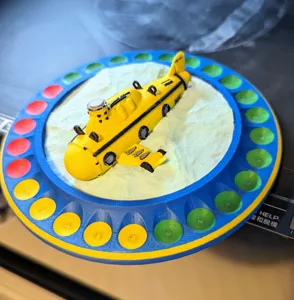
a combination 'half-card hider' (so that you can clearly see what trick was played as it 'hides' the bottom/half card) and arrow (which points at the placing player position - so that you know 'to whom' you should pay the Scout point to). Hope it helps you! https://www.printables.com/model/410461-scout-card-game-combo-half-card-hider-who-placed-a