Log in to join the conversation.
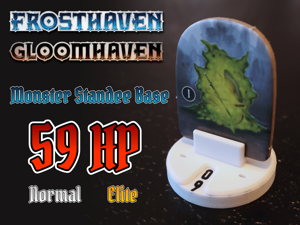
Frosthaven monster standee base 59 HP (Gloomhaven/Boardgame Health Tracker)
Please support SgtCaffran by Liking/Boosting their Print on Printables.
(12-08-23) I finally received my Prusa Mk4! I have the ability to rapid prototype a lot faster and have uploaded a new design with many small changes. The overall look hasn't changed but I'm getting good results on my Mk4 with a 0.4mm nozzle and 0.2mm layer heights! I will upload a design with slightly increased clearances later on, if this design won't work on your printer.
I still believe a 0.25mm nozzle will yield better results and I am going to fine tune the design for the 0.25mm next. Feedback is appreciated!
Monster health tracking can be be cumbersome in Gloomhaven and Frosthaven. By default, the monster health is represented by damage tokens that are difficult to count and adjust and are not close to the monster. When you want to know a monster's health, you need to find the number on the monster standee and then count the damage tokens on the sleeve with the matching number.
My monster standee base fixes all of these issues. It offers the following:
• Slim and clean design
• Up to 59 health (plenty for all regular monsters)
• Health easy to read (no math required!)
• Health readable from both sides
• Single rotation action to increase or reduce health
• No accidental changes to the monster health during gameplay
I believe it is currently the only monster base design that offers all of these pros!
The monster base has two rotating rings with digits that are coupled via a counter mechanism. The counter rotates the inner ring (representing 0, 10, 20, 30, 40 and 50) one digit whenever the outer ring (representing 0 to 9) completes a whole rotation. This allows for a design that only requires one input (the outer ring) while allowing numbers up to 59.
See the video below for some inspiration.
The clearances on this print are very small and require a high precision for the mechanism to work properly. It is strongly recommended to use a quality printer that is properly calibrated in combination with a 0,25mm nozzle and quality filament.
• High quality printer, properly calibrated
• High quality PLA
• 0,25mm nozzle
• All parts are used once per standee except for the indexing gear which is used twice
• The design is optimised for the 0,25mm nozzle 0,10mm QUALITY preset in Prusaslicer
The inner ring and outer ring should be printed in two colors with a manual color change. First, make sure to set the following settings in Prusaslicer:
• Set Printer Settings > General > Extruders to “2”
• Set Printer Settings > Custom G-code > Tool change G-code to:
• {if layer_z > 0}
M600
{endif}
• Set Printer Settings > Extruder 1 > Retraction when tool is disabled > length to “0”
• Set Printer Settings > Extruder 1 to correct color for the numbers
• Set Printer Settings > Extruder 2 > Retraction when tool is disabled > length to “0”
• Set Printer Settings > Extruder 2 to correct color for the ring
• Set Print Settings > Multiple Extruders > Wipe Tower > Enable to “unchecked”
Then, slice the model:
• Import the inner ring or outer ring
• Select the model, right click and select split > to parts
• Select the parts, right click and select change extruder > extruder 1 for the numbers and change extruder > extruder 2 for the ring (Prusaslicer will always slice the parts with the lowest extruder number first)
• Attach the indexing gear on the bottom part
• Attach both rings on the bottom part, align as shown in the images
• Attach the top
• Numerous small clearance changes for smoother operation and 0.4mm printing
• Larger pin for a better fit of the top and bottom parts
• Improved the clicky lever to give more symmetric clicks (left/right)
• Improved clearances for the gears
• Changed the guide geometry for the outer ring
• Improved the clicky lever to give more symmetric clicks (left/right)
• Changed the number font to DIN
• Halved the number of clicks (the clicky ring did two clicks per number…)
• Increased the guide for the outer ring
• Reduced clearances to 0.1mm for all rotating parts
• Improved gear geometry
• Increased gear clearance
• Increased the spring of the click ring
• Added a chamfer along the edge of the top part
• Improved the guide for the outer ring
• Reduced clearances to V3 level
• Reduced clearances of the gears
• Increased the pins between the top and bottom parts
• Added a click ring (to be tested)
• Slightly decreased the diameter of the top
• Slightly altered the indexing gear geometry
• Fixed a number misalignment issue
• Increased most of the clearances
• Fixed a clearance issue with the pins connecting the top and bottom parts (again…)
• Increased the clearance between the bottom and outer ring parts to 2x0.15mm
• Added a second pair of teeth to the outer ring that was missing in the design
• Fixed an export issue where the indexing gear was wrongfully included in the inner gear part
• Fixed a clearance issue with the pins connecting the top and bottom parts (to be tested)
• Increased the clearance on all rotating parts to 0.15 mm (to be tested)
• Improved the design by allowing the outer ring to fully extend to the bottom of the standee
• Improved some gear dimensions
• Improved some geometry with chamfers

/pic4066738.jpg)
/pic3589016.jpg)