Log in to join the conversation.
Food Chain Magnate Insert / Organizer - Incl. Employee Display & Supports Larger BGG Dry Erase Boards
Please support js500 by Liking/Boosting their Print on Printables.
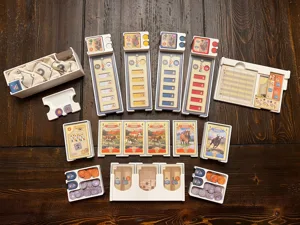
This is an insert / organizer for Food Chain Magnate and the more recent, larger dry erase milestone boards from BGG. It has no lid lift, supports premium sleeves on the cards (Gamegenic Prime sleeves shown in the images), supports vertical storage, and was designed to aid setup and teardown.
That’s great, but do we really need yet another Food Chain Magnate storage option? Maybe not, but my goal was to simultaneously accomplish a few goals that I didn’t see featured in the other options. This is very specific to the way I like to set up and play, and there are many other options if you prefer a different approach.
Supporting BGG Milestone Boards
I wanted to hold the larger BGG dry erase milestone boards. There is at least one other insert that supports the older, smaller BGG dry erase boards, but I didn’t see one that supported the larger ones (at least not while also supporting premium sleeves on the cards, which take up a lot of space). Because the insert fits these milestone boards, it does not fit the milestone cards.
Compact Employee Display that Prevents Cards from Sliding
I wanted a compact employee card display that works well both at the beginning of the game and when the card stacks are depleted. The alternatives I saw were larger or only provided a top tray to hold the cards in place. The issue with only having a top tray is that, as the card stacks are depleted, the cards have a tendency to angle in the slot and eventually fall through, landing underneath the display.
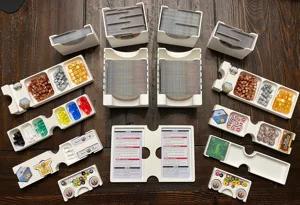
To address this issue, the employee display in this insert has two tiers. The top tier lists the employee names. The bottom tier has openings that are a bit larger than the openings on the top trays, so the cards can be easily inserted, but they prevent the cards from angling or sliding under the top tier.
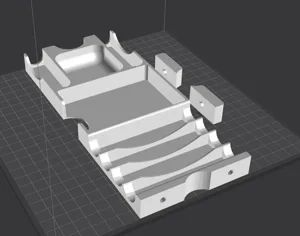
To build the employee display, you attach one of the depicted clips to the top tier of the employee display, sliding it inward until it holds securely. It is a friction fit, with the clip having an angled slot that allows you to push until the clip is secure, but no further. I suggest printing these clips with 100% infill, just to be sure they are as strong as possible. Then you add the lower tier to the first clip and secure it in the bottom slot on that clip. After that, you add the other three clips. The photos show how to step through this process. Do this with both halves of the employee display, and you are all set to load it up with cards!
No Money in the Box
Food Chain Magnate has a very tight box, especially when trying to fit sleeved cards in addition to the other features above. Because of this, and because I use Iron Clays or poker chips for money in this game, this insert does not hold the Food Chain Magnate paper money or any other money substitutes in the box.
Printing Instructions
To achieve the insert as shown, print eight of the employee board stands (preferably with 100% infill) and one of everything else (with your typical infill setting).
To create the two-color effect on the employee trays shown in the photos, in my slicer, I set up a filament color change on the two layers that correspond to the text identifying the employee names. In PrusaSlicer, if you first slice the model, you can then click the + sign next to the layer where you want to make the color change. Do this on the first layer where the text appears, and then do it again a couple layers above that to swap back to your primary color. Using this technique, I printed the top tiers of the employee stand using a white base, gray/silver text, and a white top. I believe other slicers have similar options. If you have a fancy multi-color setup that permits color changes within a layer, you could also go that route. But you can still read the text even if you print it all in one color.
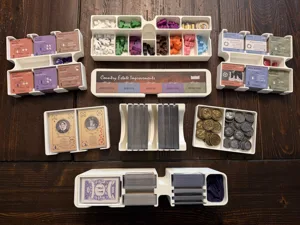
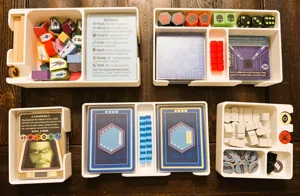
The images show how to layer everything in the box, as well as providing closer images of some of the trays.
I have included the original OpenSCAD files in case anyone wants to improve on the design for non-commercial purposes.
This is an insert for Food Chain Magnate that supports the newer, larger BGG dry erase milestone boards. It also includes a compact employee card display that prevents the cards from angling underneath the top tray during play, supports premium sleeves (Gamegenic Prime shown in the photo), has no lid lift, and supports vertical storage. See more in my Printables listing here .

More by js500