Log in to join the conversation.
Evacuation Insert/Organizer
Please support RiftForge 3D3 by Liking/Boosting their Print on Printables.
TL;DR: No-lid-lift, suitable for vertical storage, fits sleeved cards (see last page of pdf), fast setup, and teardown insert for the boardgame Evacuation. Pro Tip: shuffle the required components during re-storing into the box for an even faster setup next time.
Update 17.03.2024:
Thx to the user Michelito42 who made me aware that there was a small measurement error regarding the player board. It was a bit too tight. Therefore I uploaded a v2 of the spacer as well as the resource trays. It should be far more relaxed fitting
If you appreciate my work buy me a coffee (or two) :-)
In case you want to sell prints of my design, feel free to join my club for a commercial licence.
At least I would appreciate it if you left a like and after printing provided a rating and a comment - this would help me further improve myself.
As for the other inserts I create, I aim for the following (in priority order):
• Enhance step and tear-down part (goal: setup should never take longer than a refresh of the rules to the game)
• Opted to store the majority of sleeved cards (specific sizes of trays see uploaded pdf)
• The game box can be stored horizontally or vertically
• Try to be as lightweight and resourceful as possible - but functionality wins
• No Support needed
A few key items (further information on printing see uploaded pdf):
• Printing requirement: 0.4 nozzle, Arachne Wall Generation, largest printing object 190mm (for the resource trays there are 2 ALTernate trays to fit on those beds)
• I normally print without Top/Bottom layers and between 10 and 15% Honeycomb infills and 2 walls to achieve the look you can see in the pics. In case there are icons/information (e.g. card trays), I only print without Top/Bottom layers up to 2mm in height.
• If you use PrusaSlicer/BambuSlicer or forks of it (i.e. I use OrcaSlicer) I suggest that you load the 3mf-files - those are pre-cut and names contain additional printing information
• All those settings result in appr. 500g of filament needed for the whole print
As always, I love suggestions & feedback to improve further.
Have fun printing.
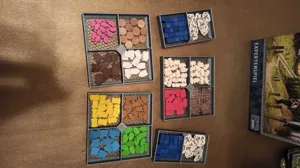
Hello dear community 🙂 I wanted to let you know that another one of my designs has become available for free download - this time for Evacuation. As always, there is a PDF for printing instructions in the download package as well as (because often overlooked) a diagram on page 2 for sorting into the box - which you are welcome to print out and place in the box. There are also custom markers (for both planets) - they are a bit small, but there isn't that much space on the player board - and they are optional 🙂 There are separate trays for the techs - you can reshuffle the used ones before putting them away - then you can just hand them out the next time you play. Oh yes - almost forgot the link if anyone wants to print it: Evacution insert - by RiftForge 3D3