LayerUp Games
Games ▾
All Games
My Games My Game Wishlist
3D Models ▾
All Game 3D Models Tabletop Accessories
Kanban BG My Prints My Future Prints
Makers ▾
Makers Designers
Contribute ▾
Submit a 3D Model Request a 3D Model 3D Model Bounties
Print Resources
Unboxing ▾
Today's Puzzle
Leaderboard Archive
Theme
Light
Dark
⌘K
Sign In Register
Calimala

Calimala

2017
Submit a 3D Model

Buy on Amazon ↗

As an Amazon Associate, LayerUp Games earns from qualifying purchases.

Cover Colors

Main colors from the cover art. Find matching filament, or tap swatches to narrow.

Hide matches ▴
Game Details

Design by Fabio Lopiano

Art by Harald Lieske, Ian O'Toole · Published by ADC Blackfire Entertainment GmbH

#1236
Rank
7.3
Rating
2.8
Weight
2–5
Players

The "Arte di Calimala" — the guild of cloth finishers and merchants in foreign cloth — was one of the greater guilds of Florence, who arrogated to themselves the civic power of the Republic of Florence during the Late Middle Ages. The woolen cloth trade was the engine that drove the city’s economy and the members of the Calimala were the elite of Florence. Throughout its long history, the Arte di Calimala supervised the execution of artistic and architectural works. Most Florentine guilds performed such activities, but the Calimala distinguished itself from other guilds through the number and prestige of the projects and the sites administered, including the construction and decoration of some of the major churches of the city. Players of Calimala are cloth merchants in medieval Florence, with a number of trusted employees that they assign to various streets within the city to carry out actions. (Each street connects two places where particular actions can be taken.) While taking these actions, players produce and deliver cloth and contribute to the construction and decoration of various buildings across the city. Employees stay on their assigned places for a while, carrying out their actions whenever the street is activated, and eventually are promoted into the city council, triggering a scoring phase. Depending on the number of players, each player has a number of action discs. In turn order, they can put one on a space between two actions, performing both actions and activating all other discs on the same space. When the fourth disc is placed on an action space, the lowest one is promoted to the city council, which triggers a scoring. After the last action disc is placed or the last scoring phase in the council is triggered, the game ends. The positions of the action spaces and sequence of scoring phases vary from game to game, making each game very different. Secret scoring objectives and action cards add uncertainty.

Economic, Industry / Manufacturing, Medieval, Renaissance, Transportation, Travel · Area Majority / Influence, End Game Bonuses, Modular Board, Order Counters, Variable Set-up

More ▾

View on BGG ↗

3 3D models for Calimala

3 designers · newest 7mo ago

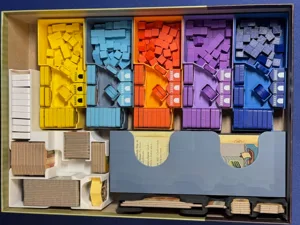
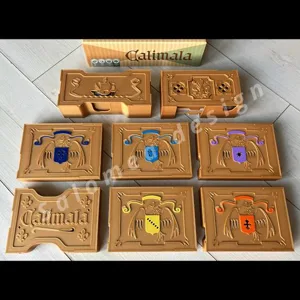
Calimala Second Edition board game insert
Inserts
Printables TJS 6
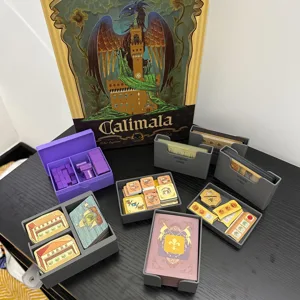
Calimala Remastered Deluxe
Inserts
Thingiverse Pendruce 1
Calimala organizers PAID
Calimala organizers
Inserts
Cults3D Salomea

Don't see the print you need? Request it

Expansions (1 with prints)

Calimala: Intrigue Expansion
2025 · 1 print
Show all expansions (1 with no prints yet)

You might also like

Similar games by designer or mechanics that also have prints.

Merv: The Heart of the Silk Road
5 prints
Forbidden Stars
Forbidden Stars
29 prints
StarCraft: The Board Game
8 prints
Crypt
Crypt
1 print
Pest
Pest
2 prints
Battle for Rokugan
Battle for Rokugan
3 prints
Board Games Game Prints Accessories Designers Photos Stats Submit a 3D Model Request a 3D Model
About Privacy Contact Tabletop Glow Up VisualSpool Discord
Powered by BoardGameGeek Powered by BoardGameGeek
Made with by Kamio · © 2026 LayerUp Games · Not affiliated with any platform
↑↓ navigate ↵ open esc close

Keyboard shortcuts

General
CtrlKOpen the command palette
/Jump to the page search
EscClear search · close dialogs
?Show this help
In the command palette
↑↓Move between results
↵Open the selected result
EscClose the palette
Open the command palette →