LayerUp Games
Games ▾
All Games
My Games My Game Wishlist
3D Models ▾
All Game 3D Models Tabletop Accessories
Kanban BG My Prints My Future Prints
Makers ▾
Makers Designers
Contribute ▾
Submit a 3D Model Request a 3D Model 3D Model Bounties
Print Resources
Unboxing ▾
Today's Puzzle
Leaderboard Archive
Theme
Light
Dark
⌘K
Sign In Register
Eiyo

Eiyo

2020
Submit a 3D Model

Buy on Amazon ↗

As an Amazon Associate, LayerUp Games earns from qualifying purchases.

Cover Colors

Main colors from the cover art. Find matching filament, or tap swatches to narrow.

Hide matches ▴
Game Details

Design by Andrea Sbragia

Art by Matthew Mizak · Published by ThunderGryph Games

#7364
Rank
6.7
Rating
2.0
Weight
1–2
Players

In Eiyo, you will need to confront hordes of enemies, trying not to be defeated, by gaining honour points determined by the opponents that you are taking down. Each turn is divided into 2 phases: The samurai phase and the enemy phase. In the samurai phase, you will draw 4 cards and then fight. You may never have more than 6 cards in hand. During the fight phase you can deliberately attack or deflect your enemies, depending on your choices and possibilities. You choose the amount of cards to spend from your hand. To face an enemy you will need to consider the enemy position and discard a Weapon card correspondingly. You can only use one of the positions shown on the card for each Weapon card you discard. At any time, you can turn a Weapon card by 90 degrees clockwise to hit an enemy in a specific position by discarding the topmost card of your Weapon deck. By attacking an enemy you will defeat only the topmost enemy of the overlapping row and will you gain honour points. To deflect an enemy you must discard the corresponding Weapon card, and you must take a Deflect token and place it on top of the corresponding Enemy row. During this turn, you won’t receive damage from that row, but you won’t get honour points. In the Enemy phase, all of the Enemies from the rows without a Deflect token on top, will attack you. The enemies will damage you based on the positions they occupy in their row. You will discard an amount of cards from your Weapon deck corresponding to the damage received by the enemies. When using the deflect tokens, discard the topmost card of a row (without receiving honour points), before starting a new round. You will lose the game if you run out of Weapon cards for the third time while there are still enemies to fight. To win the game you will need to survive having gained at least 40 honour points. The mini-expansion, Eiyo: Yamabushi, is packaged inside the base game's box. It introduces 4 Yamabushi mini-bosses to the field of battle. —description from the publisher

Card Game · Cooperative Game, Events, Hand Management, Move Through Deck, Solo / Solitaire Game, Victory Points as a Resource

More ▾

View on BGG ↗

1 3D model for Eiyo

1 designer · newest 5y ago

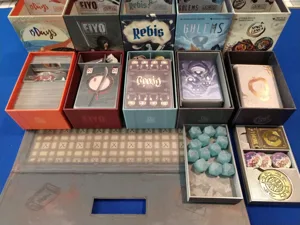
Matchbox Collection inserts - Golems, Rebis, 15 Days, Space Lunch, Eiyo
Inserts
Thingiverse ClixAccessories 11

Don't see the print you need? Request it

Expansions (0 with prints)

No expansions have prints yet.

Show all expansions (2 with no prints yet)

You might also like

Similar games by designer or mechanics that also have prints.

Kingdom Legacy: Feudal Kingdom
2 prints
Earthborne Rangers
Earthborne Rangers
23 prints
Palm Island
Palm Island
12 prints
Space Hulk: Death Angel – The Card Game
4 prints
Pathfinder Adventure Card Game: Rise of the Runelords – Base Set
1 print
Onirim (Second Edition)
1 print
Board Games Game Prints Accessories Designers Photos Stats Submit a 3D Model Request a 3D Model
About Privacy Contact Tabletop Glow Up VisualSpool Discord
Powered by BoardGameGeek Powered by BoardGameGeek
Made with by Kamio · © 2026 LayerUp Games · Not affiliated with any platform
↑↓ navigate ↵ open esc close

Keyboard shortcuts

General
CtrlKOpen the command palette
/Jump to the page search
EscClear search · close dialogs
?Show this help
In the command palette
↑↓Move between results
↵Open the selected result
EscClose the palette
Open the command palette →