LayerUp Games
Games ▾
All Games
My Games My Accessories
Game Shelf Sleeve Stash Sleeve Catalog
3D Models ▾
All Game 3D Models Tabletop Accessories
Kanban BG My Prints My Future Prints My Collections
Blog
Community ▾
Makers Designers
Submit a 3D Model Request a 3D Model 3D Model Bounties
3D Printing Resources
Unboxing #56
Theme
Light
Dark
⌘K
Sign in Join free
Field Commander: Robert E. Lee

Field Commander: Robert E. Lee

2024 Layer by Layer
Flag this page

Sign in to flag this page. Nothing changes right now either way - it tells an admin to look.

Buy this game on Amazon ↗

As an Amazon Associate, LayerUp Games earns from qualifying purchases.

Game Details

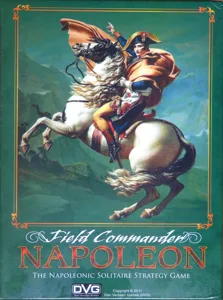
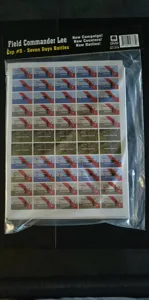
Field Commander - Robert E. Lee builds on the design and gameplay of Field Commander - Napoleon to put the player firmly in control of the Army of Northern Virginia during the American Civil War, with the Union forces controlled by an AI. Fight in 5 Campaigns Seven Days Battles Second Manassas Antietam Chancellorsville Gettysburg Field Commander - Robert E. Lee is based on the Field Commander - Napoleon design, with some important differences and developments. Difficulty Levels: The player may choose to tailor his experience of Field Commander Robert E. Lee by modifying the Difficulty Level between Regular, Hard and Veteran. There are various ways the difficulty level can affect the game and the player can choose one or more effects, or mix different Difficulty Levels to produce different effects. For example, the player could choose to use the Regular Fog of War table, combined with the Hard Command Points option and the Veteran Special Rules of a particular campaign. Scout Counters: Greater availability and use of Scout counters to create decision-heavy gameplay and the manner in which cavalry were employed on the battlefield during the American Civil War as compared to the Napoleonic era. Command Points: Command Points replace Supply Points. Command Points are used in a similar manner however, but represent reforming broken Forces or calling to arms odd Brigades and Regiments that are marching on different roads. Command Points can also be accumulated when a Force reaches certain Regions on the Battlefield Sheet and reflect greater morale. Union Orders: Each Campaign map includes a Battle Area, which is distinct from the rest of the game board (you can see it described with red borders on the sample map art). Union Forces follow Campaign Map Orders until they enter the Battle Area, at which point the Battle Area Orders table is followed. This simulates more carefully the Union actions once battle commenced properly. Union Tactics: Aggressive vs Defensive. No more sitting at the back of the Battlefield sheet blasting the advancing enemy. The Union AI will only attack when the odds are in its favor. Special Battle Plans: An expanded range of Special Battle Plans for the Union AI to use that simulate combat in the ACW. The Union AI will now only charge en masse, while Flanking Fire and Hidden March threaten the rear of the Confederate army. No place on the battlefield is safe! Capturing Artillery: Rather than Destroy artillery, both the Confederate player and the Union AI will instead capture 'abandoned' artillery and use the cannon to their own advantage. Historically this was especially important to the Confederates who suffered at the hands of superior Union guns and ammunition. Artillery Range Attenuation: The further away the target, the less effective the artillery! Each Campaign introduces detailed Special Rules that highlight the key events, features and commander personalities of each battle. —description from the publisher

American Civil War, Civil War, Wargame · Area Movement, Dice Rolling, Multiple Maps, Simulation, Solo / Solitaire Game

More ▾

View on BGG ↗

Vincent Cooper , designer

Wan Chiu , artist

Dan Verssen Games (DVG) , publisher

#14641
BGG Rank ↗
8.4
Rating
3.8
Weight
1
Players
Cover Colors

Main colors from the cover art. Find matching filament, or tap swatches to narrow.

Matching filament

1 3D model for Field Commander: Robert E. Lee

Submit a 3D Model
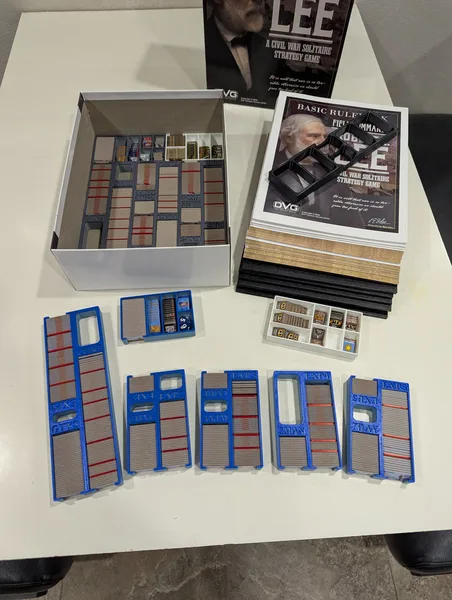
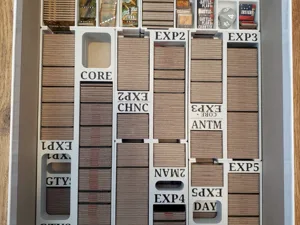
DVG's Field Commander Lee Insert-Color/Bambu-ized
Inserts
MakerWorld B1g Dav3

1 designer · newest 5mo ago

Don't see the 3D model of your dreams? Request it here

Expansions (5)

Field Commander: Robert E. Lee – Expansion #1 Gettysburg Battle Pack
2025 · no models yet
Field Commander: Robert E. Lee – Expansion #2 Chancellorsville Battle Pack
2025 · no models yet
Field Commander: Robert E. Lee – Expansion #3 Antietam Battle Pack
2025 · no models yet
Field Commander: Robert E. Lee – Expansion #4 Second Manassas Battle Pack
2025 · no models yet
Field Commander: Robert E. Lee – Seven Days Battles Battle Pack
2024 · no models yet
Show only expansions with models
Reimplements: Field Commander: Napoleon 2011 0
Reimplemented by: Brawner's Farm 2027 0

You might also like

Similar games by designer or mechanics that also have 3D models.

Era of Tribes
Era of Tribes
3 models
Battle Cry: 150th Civil War Anniversary Edition
1 model
Civil War
Civil War
1 model
Pavlov's House
Pavlov's House
4 models
Dune: War for Arrakis
38 models
V-Sabotage
V-Sabotage
2 models
Board Games Game Prints Accessories Designers Photos Stats Submit a 3D Model Request a 3D Model
Blog Guides About Privacy Contact VisualSpool Discord
Powered by BoardGameGeek Powered by BoardGameGeek
The newsletter

Join the LayerUp Newsletter and be notified of new blog posts and 3D model reviews/articles.

Made with by Kamio · © 2026 LayerUp Games · Not affiliated with any platform
↑↓ navigate ↵ open esc close

Keyboard shortcuts

General
CtrlKOpen the command palette
/Jump to the page search
EscClear search · close dialogs
?Show this help
In the command palette
↑↓Move between results
↵Open the selected result
EscClose the palette
Open the command palette →