LayerUp Games
Games ▾
All Games
My Games My Game Wishlist
3D Models ▾
All Game 3D Models Tabletop Accessories
Kanban BG My Prints My Future Prints
Makers ▾
Makers Designers
Contribute ▾
Submit a 3D Model Request a 3D Model 3D Model Bounties
Print Resources
Unboxing ▾
Today's Puzzle
Leaderboard Archive
Theme
Light
Dark
⌘K
Sign In Register
Heroes: Write & Conquer

Heroes: Write & Conquer

2025
Submit a 3D Model

Buy on Amazon ↗

As an Amazon Associate, LayerUp Games earns from qualifying purchases.

Cover Colors

Main colors from the cover art. Find matching filament, or tap swatches to narrow.

Hide matches ▴
Game Details

Design by Egor Nikolaev, Yuri Zhuravljov

Art by Sergey Dulin, Roman Kuzmin, Anton Kvasovarov +6 more · Published by Hobby World

#6973
Rank
7.4
Rating
2.7
Weight
2–4
Players

Heroes: Write & Conquer is a comprehensive strategy game in a handheld format. Explore territories, build castles, gather troops and search for powerful artifacts. In Heroes, each player chooses their own player board of a certain faction. The factions from this game can be mixed with the factions from Heroes II: Write & Conquer and Heroes III: Write & Conquer. The game lasts for 16 rounds. At the beginning of a round, the first player chooses four actions out of five that all players in that round will perform. The first player writes the numbers 1, 2, 3 and 4 in the boxes of the selected actions — one number per box. The number determines the order in which the action is performed and its level. Actions are resolved in ascending numerical order, with higher numbers representing stronger actions. There are 3 types of actions in the game: Wood, iron and gold gathering allow you to add as much of that resource to your inventory, as the level of the action is. Resources are needed for building and recruitment. Building and recruitment action allows you to build structures and hire units of a corresponding level. Structures give you unique effects, while units are needed to fight with other players, monsters, or to be able to claim fortresses and artifacts. Finally, movement allows you to move to other sectors based on the amount of movements points you have in this round. After all players finished their movement, different types of fights can be triggered. Players can fight each other if they happened to be at the same sector, or they can claim a fortress or an artifact of that sector. They can also fight monsters for reward. In order to do that, they’ll be spending combat units and compare their strength. At the end of the game, players will count their victory points for the structures built, fortresses and artifacts claimed, resources gathered and monsters defeated. The player with the most VPs wins. —description from the publisher

Adventure, Exploration, Fantasy, Fighting, Video Game Theme · Action Queue, Area Movement, Auction: Sealed Bid, Income, Paper-and-Pencil, Variable Player Powers

More ▾

View on BGG ↗

1 3D model for Heroes: Write & Conquer

1 designer · newest 5mo ago

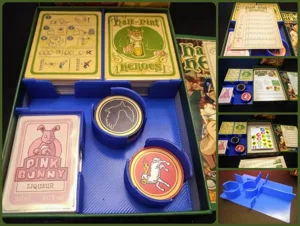
Hal-Pint Heroes Organizer (incl. Happy Hour)
Inserts
MakerWorld Fabmaszter

Don't see the print you need? Request it

You might also like

Similar games by designer or mechanics that also have prints.

A Game of Thrones: The Board Game (Second Edition)
5 prints
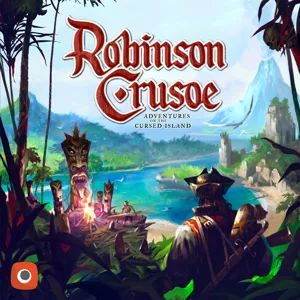
Robinson Crusoe: Adventures on the Cursed Island
23 prints
Snails
Snails
1 print
Dead Cells: The Rogue-Lite Board Game
5 prints
Rising Sun
Rising Sun
34 prints
Cloudspire
Cloudspire
25 prints
Board Games Game Prints Accessories Designers Photos Stats Submit a 3D Model Request a 3D Model
About Privacy Contact Tabletop Glow Up VisualSpool Discord
Powered by BoardGameGeek Powered by BoardGameGeek
Made with by Kamio · © 2026 LayerUp Games · Not affiliated with any platform
↑↓ navigate ↵ open esc close

Keyboard shortcuts

General
CtrlKOpen the command palette
/Jump to the page search
EscClear search · close dialogs
?Show this help
In the command palette
↑↓Move between results
↵Open the selected result
EscClose the palette
Open the command palette →