LayerUp Games
Games ▾
All Games
My Games My Game Wishlist
3D Models ▾
All Game 3D Models Tabletop Accessories
Kanban BG My Prints My Future Prints
Makers ▾
Makers Designers
Contribute ▾
Submit a 3D Model Request a 3D Model 3D Model Bounties
Print Resources
Unboxing ▾
Today's Puzzle
Leaderboard Archive
Theme
Light
Dark
⌘K
Sign In Register
Huns

Huns

2018
Submit a 3D Model

Buy on Amazon ↗

As an Amazon Associate, LayerUp Games earns from qualifying purchases.

Cover Colors

Main colors from the cover art. Find matching filament, or tap swatches to narrow.

Hide matches ▴
Game Details

Design by Fneup

Art by Anthony Wolff · Published by La Boîte de Jeu

#5163
Rank
6.6
Rating
2.1
Weight
2–4
Players

Winter 453: The Huns reign supreme over half of the known world. The great Khan, king of the Huns, is suffering, and there are many who dream of taking his place. The Khan must appoint his successor. He will choose the bravest and most glorious of his generals, and you intend for that to be you! But you are not the only contender, and you will have to prove your worth. Each turn in Huns you must choose between raiding for resources or picking a card that will grant you a special ability. In more detail, the game includes five decks of cards in five colors that feature equipment, raids, mercenaries, curses, and treasure, as well as goods cubes in the same five colors. Each player starts the game with two wagons that require specific colored goods to fill them. At the start of a round, the active player rolls five d3 dice in the five colors, then chooses one of the dice and takes either cubes or cards in this color. If you take cards, they draw 1-3 cards (based on the die roll), keep one of them, then place the others face down under this deck. Equipment gives you an in-game bonus, raids have a one-time effect, treasure earns you points at game's end if you meet the condition listed, mercenaries give you a reusable effect once you give them goods, and curses are played on opponents, who must apply goods to them to dispel their effect. If you take cubes, you can place them on a single mercenary card, a single curse card, or any number of your wagons in the appropriate spaces. If you fill a wagon, you draw a new one from those on display. Each player takes one die in turn, choosing cards or goods, until all the dice have been chosen. The first player marker then moves clockwise, and the new active player rolls all five dice again. When one of the cube colors or one of the decks is empty at the end of a round, the game ends. Players score points for raids undertaken, treasure achieved, mercenaries paid off, and wagons delivered, and whoever has the most points wins! Card combos, drafting strategies, and resource management is what Huns is about, set in the universe of the mighty warriors of Huns.

Ancient, Card Game · Dice Rolling, Open Drafting

More ▾

View on BGG ↗

1 3D model for Huns

1 designer · newest 8y ago

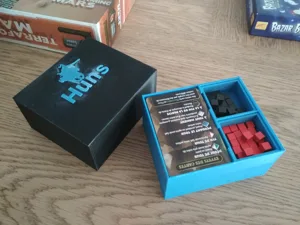
Huns Board Game , Compact travel Organizer
Inserts
Thingiverse gruelt 9

Don't see the print you need? Request it

Expansions (1)

Huns: Soutien opportun
2018 · no prints yet
Show only expansions with prints

You might also like

Similar games by designer or mechanics that also have prints.

Mythic Battles: Pantheon
6 prints
Mythic Battles: Ragnarök
2 prints
Mythic Battles: Isfet
2 prints
IUNU
IUNU
1 print
Dice Forge
Dice Forge
11 prints
Cyclades
Cyclades
8 prints
Board Games Game Prints Accessories Designers Photos Stats Submit a 3D Model Request a 3D Model
About Privacy Contact Tabletop Glow Up VisualSpool Discord
Powered by BoardGameGeek Powered by BoardGameGeek
Made with by Kamio · © 2026 LayerUp Games · Not affiliated with any platform
↑↓ navigate ↵ open esc close

Keyboard shortcuts

General
CtrlKOpen the command palette
/Jump to the page search
EscClear search · close dialogs
?Show this help
In the command palette
↑↓Move between results
↵Open the selected result
EscClose the palette
Open the command palette →