LayerUp Games
Games ▾
All Games
My Games My Game Wishlist
3D Models ▾
All Game 3D Models Tabletop Accessories
Kanban BG My Prints My Future Prints
Makers ▾
Makers Designers
Contribute ▾
Submit a 3D Model Request a 3D Model 3D Model Bounties
Print Resources
Unboxing ▾
Today's Puzzle
Leaderboard Archive
Theme
Light
Dark
⌘K
Sign In Register
Mundus Novus

Mundus Novus

2011
Submit a 3D Model

Buy on Amazon ↗

As an Amazon Associate, LayerUp Games earns from qualifying purchases.

Cover Colors

Main colors from the cover art. Find matching filament, or tap swatches to narrow.

Hide matches ▴
Game Details

Design by Bruno Cathala, Serge Laget

Art by Vincent Dutrait · Published by asmodee

#3228
Rank
6.6
Rating
2.2
Weight
2–6
Players

Spain, 16th century. You are a powerful ship owner in search of wealth from the recently discovered Mundus Novus (New World). Your goal: Charter fleets of caravels to collect valuable goods (including the legendary Inca relics) and trade to form the best sets to expand your business empire and make your fortune. The game is played using two decks of cards: a deck of resource cards, which contains cards representing ten different resources, and a deck of development cards, which give special benefits to their owners. The game is played in rounds, with each round consisting of four phases: Each round starts with the Event phase, in which a random event may occur that affects all players. The next phase is the Supply phase. Each player receives five random resource cards, plus one resource card for each caravel (a type of development card) that he owns, chosen from a common pool. Then, during the Trade phase, the players trade some of their cards. One of the players, the Trade Master, determines how many resource cards (2, 3 or 4) each player must offer for trade. The player that offers the resources with the highest value becomes the new Trade Master. He chooses one of the resources offered by one of the other players, and adds it to his hand, or exchanges it with a card from the market (three face-up cards that are available for such exchanges). Then, the player that he has taken a card from gets to take a card, and so on, until all the cards have been taken. Finally, during the Progression phase, the players exchange their resources for doubloons and developments. A player may exchange one set of three or more of the same resource for a development. Bigger combinations and rarer resources will allow more choice of which development can be selected from the five that are on offer. In addition, players can exchange sets of three or more different goods for doubloons, with bigger combinations earning more doubloons. If a player can make a combination of ten different cards (i.e., one of each type of resource), he wins the game. Alternatively, if a player has accumulated 75 doubloons, he wins the game. If no player has achieved victory by the time the development deck runs out, the player who has accumulated the most doubloons wins.

Card Game, Economic, Nautical, Renaissance · Hand Management, Open Drafting, Set Collection, Trading

More ▾

View on BGG ↗

1 3D model for Mundus Novus

1 designer · newest 9y ago

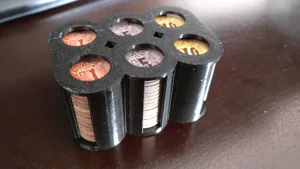
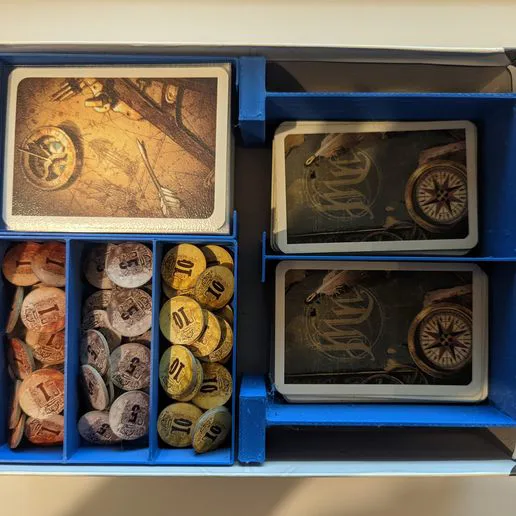
Mundus Novus Money Tray
Inserts
Thingiverse Ducttape2021 10

Don't see the print you need? Request it

Expansions (1)

No Image
Mundus Novus: Vers de Nouveaux Horizons
2012 · no prints yet
Show only expansions with prints

You might also like

Similar games by designer or mechanics that also have prints.

TRÖK
TRÖK
1 print
Shadows over Camelot
5 prints
Millennium Blades
Millennium Blades
4 prints
Millennium Blades: Collusion
1 print
Archipelago
Archipelago
3 prints
Shipwrights of the North Sea
4 prints
Board Games Game Prints Accessories Designers Photos Stats Submit a 3D Model Request a 3D Model
About Privacy Contact Tabletop Glow Up VisualSpool Discord
Powered by BoardGameGeek Powered by BoardGameGeek
Made with by Kamio · © 2026 LayerUp Games · Not affiliated with any platform
↑↓ navigate ↵ open esc close

Keyboard shortcuts

General
CtrlKOpen the command palette
/Jump to the page search
EscClear search · close dialogs
?Show this help
In the command palette
↑↓Move between results
↵Open the selected result
EscClose the palette
Open the command palette →