LayerUp Games
Games ▾
All Games
My Games My Game Wishlist
3D Models ▾
All Game 3D Models Tabletop Accessories
Kanban BG My Prints My Future Prints
Makers ▾
Makers Designers
Contribute ▾
Submit a 3D Model Request a 3D Model 3D Model Bounties
Print Resources
Unboxing ▾
Today's Puzzle
Leaderboard Archive
Theme
Light
Dark
⌘K
Sign In Register
Stray Cats

Stray Cats

2018
Submit a 3D Model

Buy on Amazon ↗

As an Amazon Associate, LayerUp Games earns from qualifying purchases.

Cover Colors

Main colors from the cover art. Find matching filament, or tap swatches to narrow.

Hide matches ▴
Game Details

Design by Thyyen Ta

Art by Thyyen Ta · Published by Flowersflame

4.5
Rating
1.0
Weight
2–8
Players

Stray Cats is a quick, fun, easy-to-learn card game to bring a home sweet home for cats. Depending on the current active Paw Law, the players may place the right cat in the going home pile. The first player with no more cards on hand is the winner. But not so fast, there are home cards and a few special cards that change the Paw Law and prevent you from entering your cat cards. Plus all the special effect cards are not allowed to play as the Last Card. The game fits for ages 12+ and 2-6 or 2-8 players depending on deck versions. —description from the designer

Animals, Card Game, Children's Game

More ▾

View on BGG ↗

1 3D model for Stray Cats

1 designer · newest 18mo ago

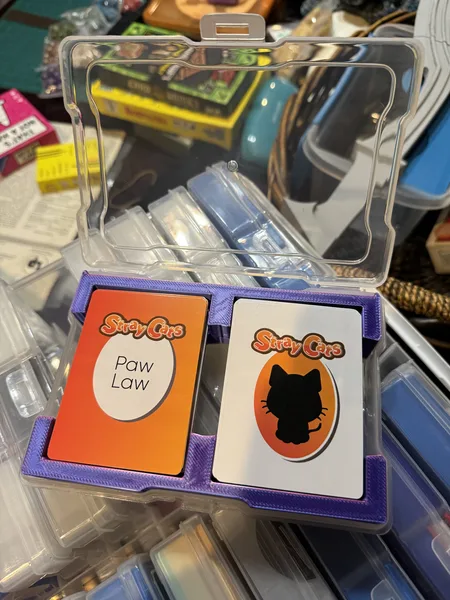
Stray Cats card game photo caddy instert
Photo Caddy Inserts
Printables Stripes 003

Don't see the print you need? Request it

Expansions (2)

Stray Cats: Holiday Surprise
2019 · no prints yet
Stray Cats: Housing a Pet
2019 · no prints yet
Show only expansions with prints
Board Games Game Prints Accessories Designers Photos Stats Submit a 3D Model Request a 3D Model
About Privacy Contact Tabletop Glow Up VisualSpool Discord
Powered by BoardGameGeek Powered by BoardGameGeek
Made with by Kamio · © 2026 LayerUp Games · Not affiliated with any platform
↑↓ navigate ↵ open esc close

Keyboard shortcuts

General
CtrlKOpen the command palette
/Jump to the page search
EscClear search · close dialogs
?Show this help
In the command palette
↑↓Move between results
↵Open the selected result
EscClose the palette
Open the command palette →