LayerUp Games
Games ▾
All Games
My Games My Game Wishlist
3D Models ▾
All Game 3D Models Tabletop Accessories
Kanban BG My Prints My Future Prints
Makers ▾
Makers Designers
Contribute ▾
Submit a 3D Model Request a 3D Model 3D Model Bounties
Print Resources
Unboxing ▾
Today's Puzzle
Leaderboard Archive
Theme
Light
Dark
⌘K
Sign In Register
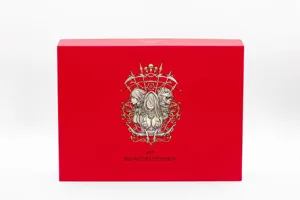
The Order of Veiel

The Order of Veiel

2020
Submit a 3D Model

Buy on Amazon ↗

As an Amazon Associate, LayerUp Games earns from qualifying purchases.

Cover Colors

Main colors from the cover art. Find matching filament, or tap swatches to narrow.

Hide matches ▴
Game Details

Design by Alexandre Rousseau, David Rousseau

Art by Coline Chausse, Shredderdima · Published by PARIA

#10916
Rank
7.8
Rating
2.3
Weight
1–7
Players

The Order of Veiel is a cooperative/ion game taking place in a dark and complex fantasy universe. Intended for 1 to 7 players, the game offers a team of adventurers the chance to face the merciless dungeon master and his corrupt hordes of monsters. You must do your best to overcome the torments of the crypt. Mutual aid, reflection and decision-making will be key for your journey. You can either play against the game or against another player. If you face a player, he'll become the dungeon master by creating the dungeon, controlling the monsters and launching events at the other players. If you face the game, all the above are automated. All the other player will take control of one of the 13 characters. You'll be fighting monsters, avoiding traps and curses, opening chest and doors, spending money to the smith or the alchemist. Everything you gather in this adventure is for the entire team. You'll think together to optimize your progression to have a chance to defeat one of the 4 bosses. Combats are turn-based. Heroes take action first. They can either use their weapons, use their skills or use a consummable object. Once they all did an action, it's the monsters' turn. Monsters tends to attack the hero holding the defender token. Some of them can choose their target. The dungeon is a layout of 6 to 15 cards (at the end of the games). Heroes enter the crypt by turning a card face up (Monsters, chests ...). They resolve the card before deciding to go back to the camp or going deeper in the crypt and therefore turning the next card face up. Once they are at the far end of the dungeon, they can decide to face the boss or the go back to the camp. At the beginning of the game, being a coward is the only option. At some point, you'll have to face your ultimate nemesis. Beat him and you'll win but fail to do so and you'll lose the game. —description from the publisher

Adventure, Medieval · Cooperative Game, Critical Hits and Failures, Role Playing, Team-Based Game

More ▾

View on BGG ↗

1 3D model for The Order of Veiel

1 designer · newest 5y ago

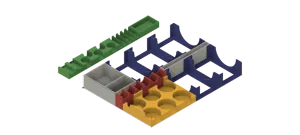
insert ordre de veiel chap 1
Inserts
Thingiverse wolve17 5

Don't see the print you need? Request it

Expansions (2)

No Image
L'Ordre de Veiel: Les Miraculés D'Alenmur
2023 · no prints yet
L'Ordre de Veiel: Chapitre II – L'Héritage du Roi
2022 · no prints yet
Show only expansions with prints

You might also like

Similar games by designer or mechanics that also have prints.

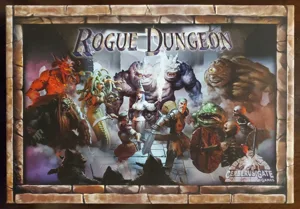
Rogue Dungeon: 2nd Edition
2 prints
Kingdom Death: Monster
104 prints
Gloomhaven
Gloomhaven
79 prints
Gloomhaven: Jaws of the Lion
47 prints
Arydia: The Paths We Dare Tread
6 prints
Aventuria: Adventure Card Game
1 print
Board Games Game Prints Accessories Designers Photos Stats Submit a 3D Model Request a 3D Model
About Privacy Contact Tabletop Glow Up VisualSpool Discord
Powered by BoardGameGeek Powered by BoardGameGeek
Made with by Kamio · © 2026 LayerUp Games · Not affiliated with any platform
↑↓ navigate ↵ open esc close

Keyboard shortcuts

General
CtrlKOpen the command palette
/Jump to the page search
EscClear search · close dialogs
?Show this help
In the command palette
↑↓Move between results
↵Open the selected result
EscClose the palette
Open the command palette →